Make sensitivity visible.
Use consistent security markings to help colleagues recognise how an email or document should be handled.
Classification in Office → ClassifyItClassify. Protect. Share.
For compliance, security and interoperability
Apply your organisation’s protective markings, add interoperable iCLASS labels, and protect document content with CI-TDF containers and OpenSSL-backed encryption—all within your Office workflow.
From €10 per licence · 1,000+ licences · excl. VAT
Licensing and purchase options · Explore the product
ClassifyIt 7.0 shareware · 64-bit Windows desktop Office
Outlook · Word · Excel · PowerPoint
See ClassifyIt in action
A short introduction to ClassifyIt in Outlook, Word, PowerPoint and Excel: apply visible markings, add iCLASS metadata, and export a Trusted Data Format container with CryptIt.
ClassifyIt integrates into Microsoft Office: Outlook, Word, PowerPoint and Excel.
ClassifyIt and CryptIt appear in the ribbon, right where you work.
Choose a classification and release audience. Insert applies your selected marking.
The visible marking helps readers recognise the sensitivity of the information.
In the background, the iCLASS standard expresses classification and release information as structured metadata.
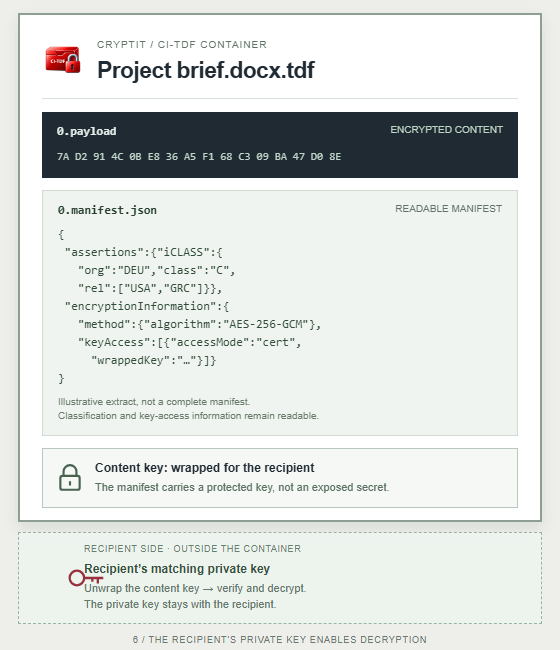
Next, use CryptIt to export a Trusted Data Format container.
Encrypted content. Readable metadata. The private key stays outside the container.
Classify. Standardise. Protect. Try ClassifyIt at classifyit.eu.
Next: Classification & release markings · iCLASS and paragraph labels
Different markings · shared understanding
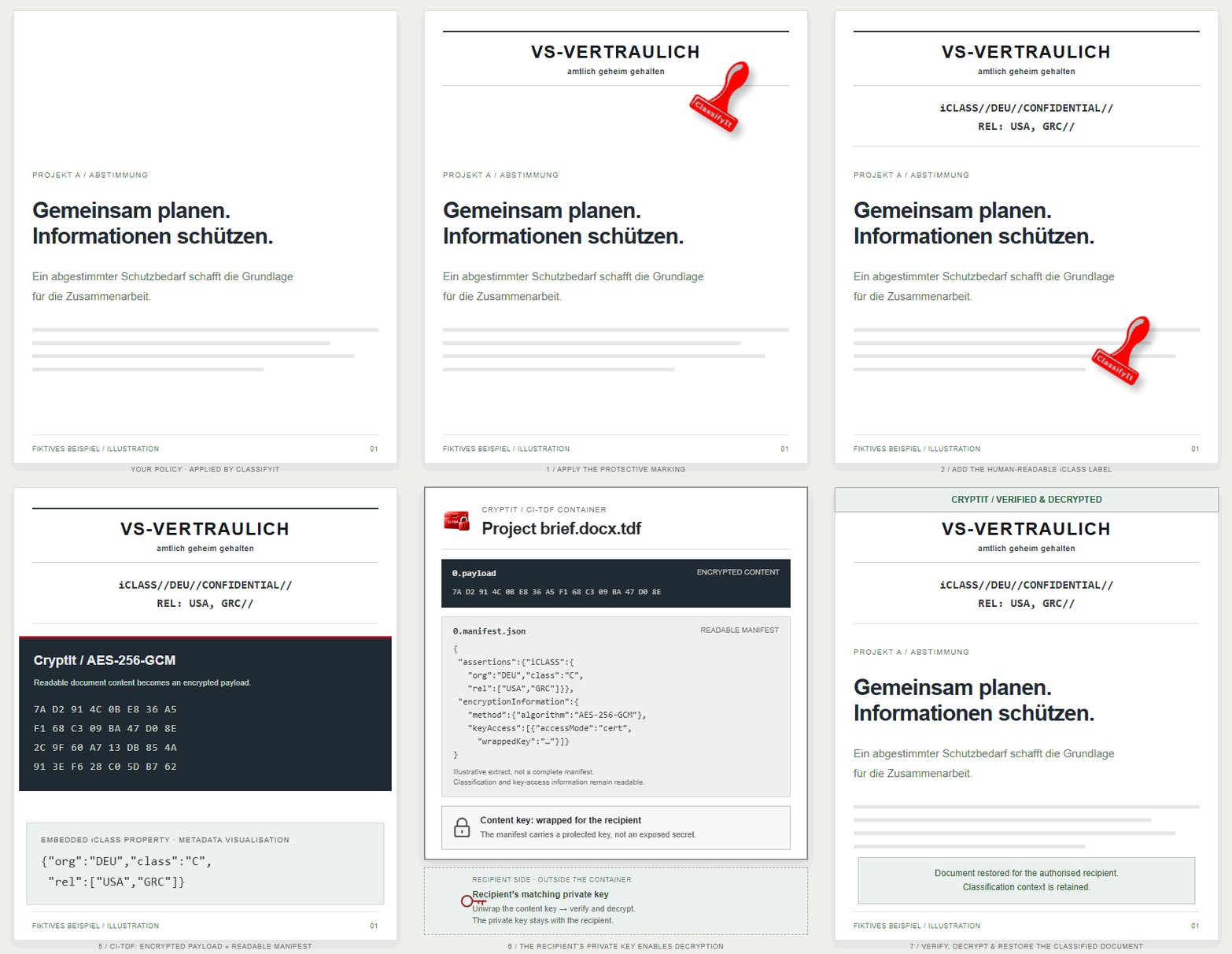
ClassifyIt applies each originator’s configured protective marking, adds the human-readable iCLASS label and records the technical classification property. Three national policies, one shared structure.
Applied by ClassifyItYour policy → document markingsILLUSTRATIVE PROJECT BRIEF
Example release authorisation:
United States and Greece.
{"org":"DEU","class":"C",
"rel":["USA","GRC"]}Applied by ClassifyItYour policy → document markingsILLUSTRATIVE PROJECT BRIEF
Example release authorisation:
Germany and Greece.
{"org":"USA","class":"C",
"rel":["DEU","GRC"]}Applied by ClassifyItYour policy → document markingsILLUSTRATIVE PROJECT BRIEF
Example release authorisation:
Germany and the United States.
{"org":"GRC","class":"C",
"rel":["DEU","USA"]}Keep the protective marking and apply the originating organisation’s handling rules and required release caveats.
The additional label identifies the originator, classification and permitted release communities.
Structured iCLASS metadata supports gateways and DLP systems configured to interpret the policy.
Illustrative markings and exchange scenario, not operational documents or a release authorisation. The “Applied by ClassifyIt” badges explain the illustration; they are not an additional protective marking. Actual equivalence, national marking requirements and disclosure permissions follow the applicable policies and security agreements. iCLASS supplements the protective marking.
Explore the iCLASS standard →Clarity is the first step
ClassifyIt connects your information handling policy with everyday work, from the first label to the document you share.
Use consistent security markings to help colleagues recognise how an email or document should be handled.
Classification in Office →Add structured classification information for mail gateways and DLP systems configured to interpret your policy.
Understand iCLASS →Explore v7.0 CI-TDF containers, integrity verification and optional encryption for documents and attachments.
Explore CryptIt →Introducing version 7.0
CI-TDF brings the document, its classification and integrity information into one container. Licensed encryption adds certificate or PIN access using OpenSSL-backed cryptography.
Also in v7.0: Word paragraph markings Beta — individual paragraph classification for controlled test environments. See the proof of concept →
Explore what’s new →ClassifyIt 7.0 shareware trial available for 64-bit Office.
 CLASSIFYIT TRUSTED DATA FORMAT
01 Document content
02 Classification context
03 Integrity verification
Illustrative structure · encryption depends on mode and licenceIn your daily workflow
Classify the information, choose an appropriate protection mode and exchange it with the people who need it.
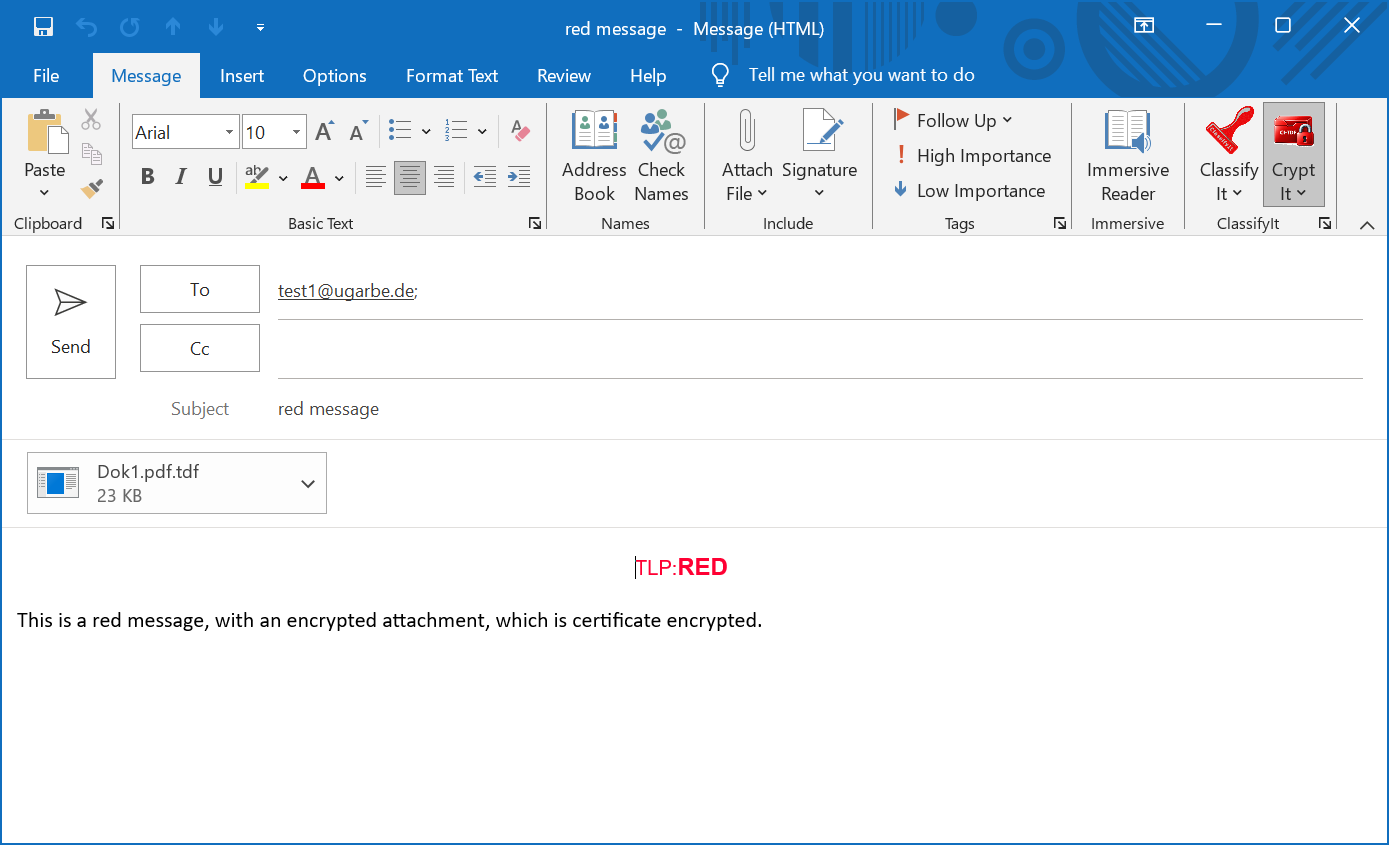
Apply your organisation’s labels and release markings.
Choose a CI-TDF mode appropriate to your exchange.
Recipients verify and restore the classified content.
For information managers
Configure labels and enforcement, distribute a shared policy and pilot it in your Windows desktop Office environment.
Explore administration →Bring your policy into Office
Discuss your markings, your Office environment and a practical evaluation.